In AppSource reviewBFVZ PowerGantt Lite · Power BI custom visual

A clean, fast Gantt chart for Power BI.

Bind Task Name, Start and Finish and the chart draws. Add a Group field for phases with summary bars, Task IDs and Predecessors for dependency lines and a computed critical path, and baseline dates for slip and gain shading. The same look and the same task table as BFVZ PowerGantt, at a price every project team can carry.

$6
Creator, per user per month · Viewer $2
13
Schedule health checks, DCMA and GAO aligned
30,000
Rows per visual
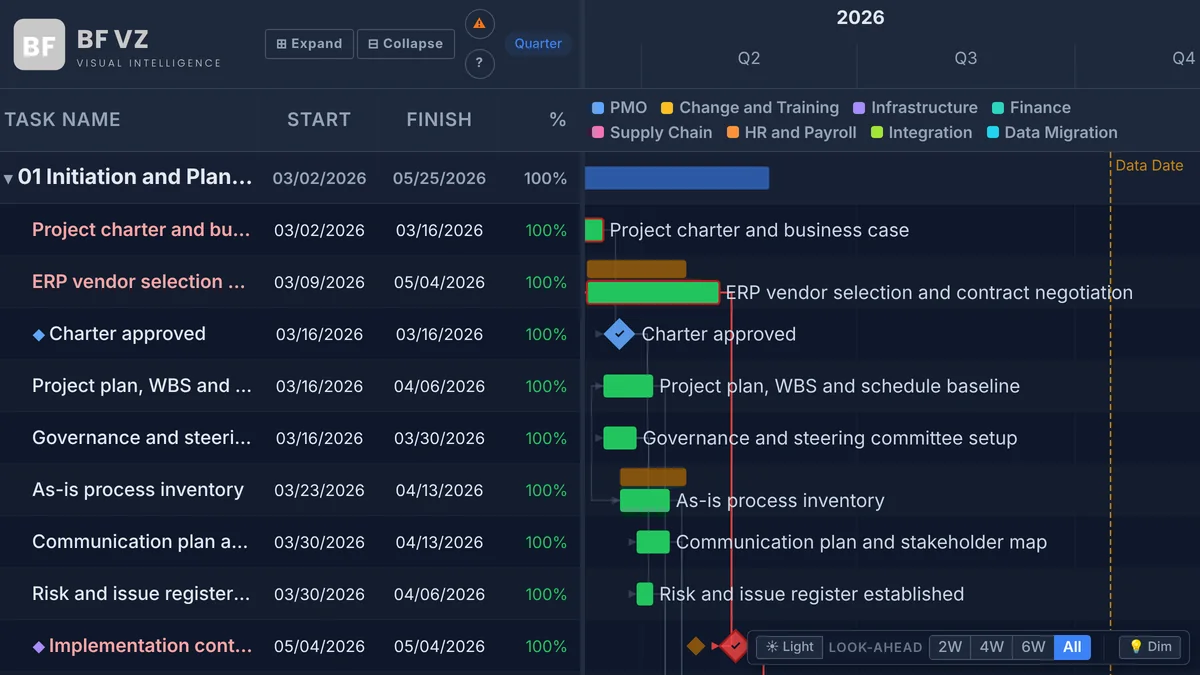
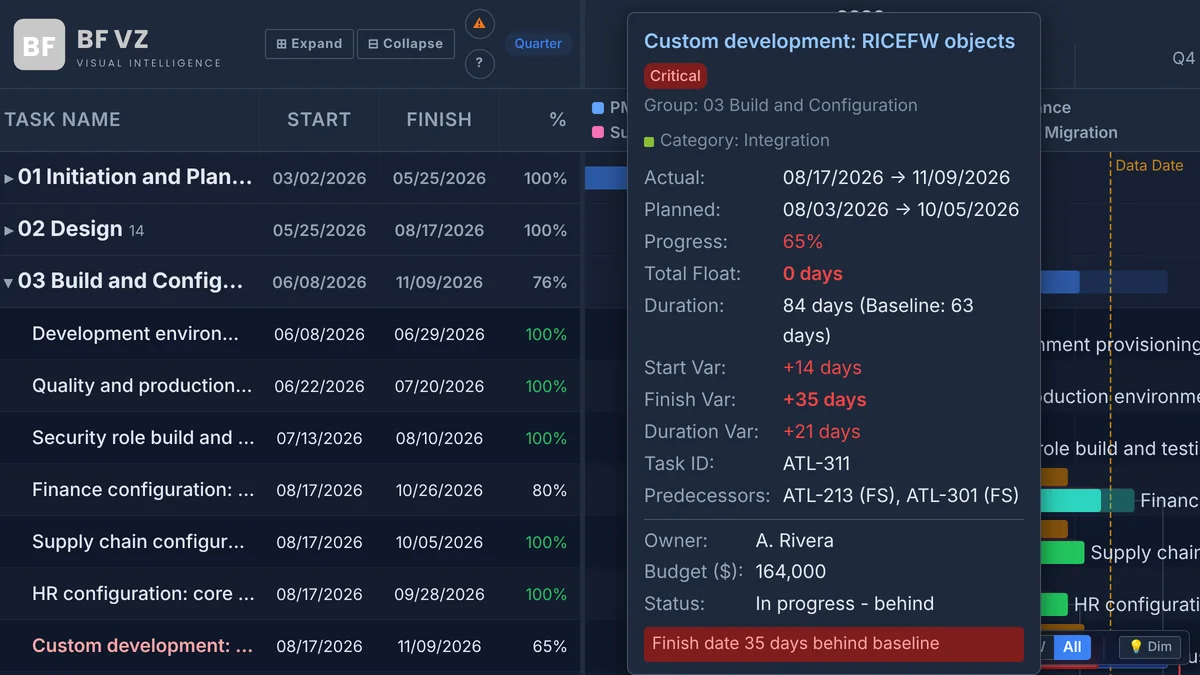
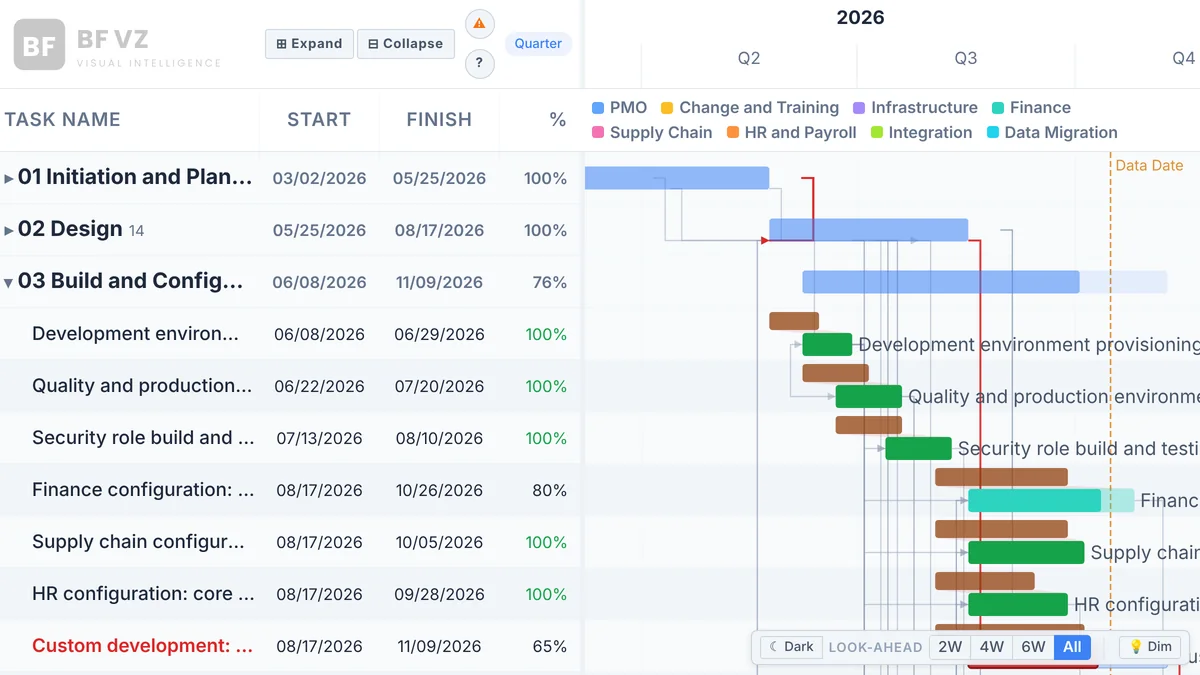
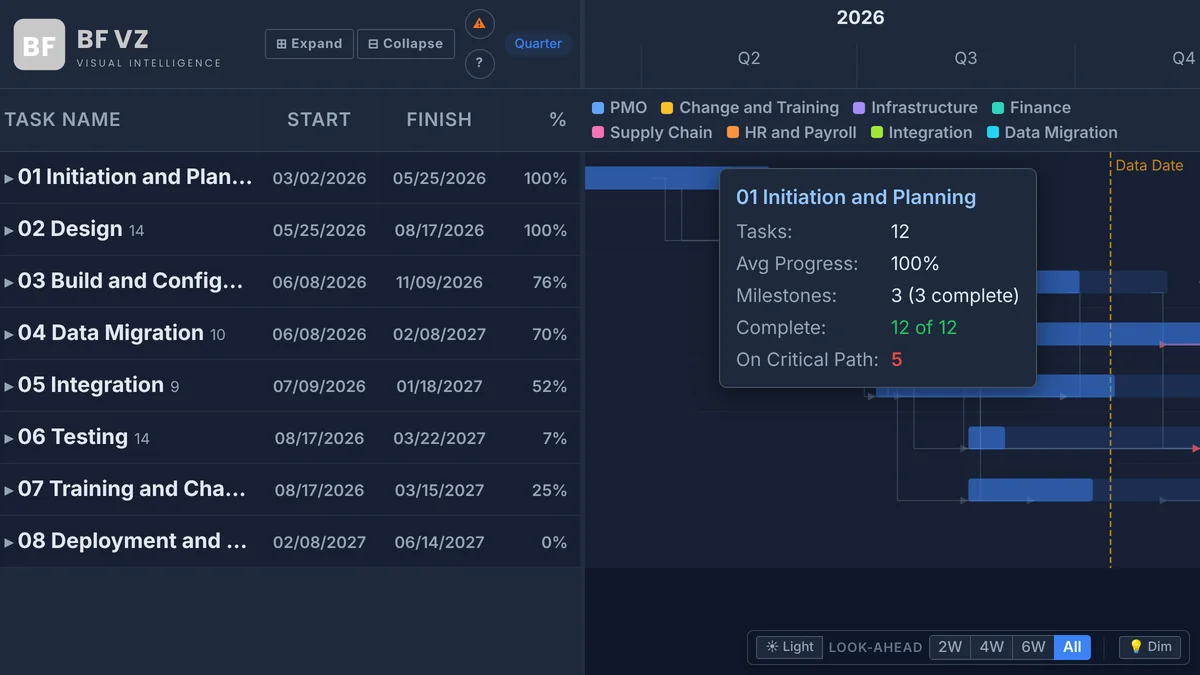
BFVZ PowerGantt Lite on a 100-task ERP implementation: phases as groups with summary bars, category colors with a legend, baseline bars, the critical path in red, milestones and the Data Date line
The visual

Everything a project Gantt needs, with nothing to configure first

One row per task is enough to start. Each optional field you bind turns on another layer: grouping, dependencies and the critical path, baselines, milestones, category colors, extra tooltip fields.

Setup

Up and running in three steps

No model changes, no relationships to build. One table with a row per task, bound to the data roles below.

Data roleRequired?What it turns on
Task Name, Start Date, Finish DateRequiredThe task bars and the grid; this is all the visual needs to draw.
GroupOptionalOne grouping level (phase, workstream, team) with summary bars and expand or collapse.
Task ID + PredecessorsOptionalDependency lines and the computed critical path. Predecessors as T-001, T-002SS+5, T-003FF-2; FS is assumed.
Baseline Start, Baseline FinishOptionalBaseline bars, slip and gain shading, start and finish variance in the tooltip.
% CompleteOptionalProgress fill on each bar (0 to 100; set the field to Don’t summarize).
Milestone TypeOptionalAny non-blank value marks a milestone; zero-duration tasks are milestones automatically.
CategoryOptionalColors the bars by value and adds a legend; up to eight values get their own color picker.
Tooltip FieldsOptionalAny number of extra fields, shown at the bottom of the task tooltip with their field names.

Coming from Primavera P6 or Microsoft Project? The free BFVZ DataBridge templates turn a P6 XER or a Project XML export into these columns; Lite reads the same task table as BFVZ PowerGantt, so a DataBridge output maps straight in.

Which one?

PowerGantt Lite or BFVZ PowerGantt

Both read the same task table and draw the same chart. Lite is the project view; BFVZ PowerGantt adds the program depth. Start with Lite and move up by adding the full visual and binding the same fields.

CapabilityBFVZ PowerGantt LiteBFVZ PowerGantt
GroupingOne Group level with summary barsN-level WBS
Critical pathComputed from the logic, with the Bridge Critical Chain optionComputed from the logic, program-level across projects, near-critical flagged at your float threshold
RelationshipsFS, SS, FF, SF with lags and leadsFS, SS, FF, SF with lags and leads
Baselines, milestones, Data DateYesYes
Bar coloringCategory colors with a legend, up to eight of your own colorsConditional RAG status rules and discipline colors
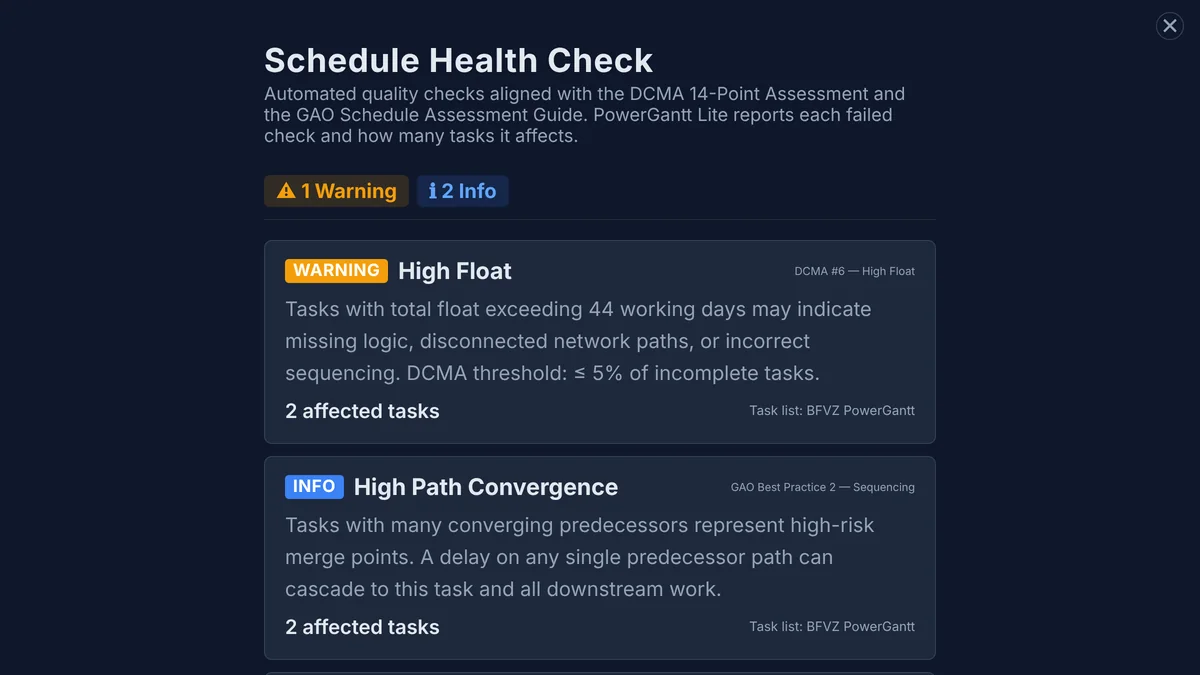
Schedule Health Check13 checks, with the number of affected tasks per checkEvery affected task listed with its Task ID and the finding
Look-ahead window (2W, 4W, 6W)Preview only; Lite always shows the whole scheduleYes
Reference lines and bandsNoOutage windows, permit dates, seasonal constraints
ResourcesNoResource column and overallocation marked on the bars
Data grid columnsTask Name, Start, Finish, Duration, %Plus float, resource and your own columns
Rows per visual30,00030,000
ThemesLight and darkLight and dark
Price per user per monthCreator $6 · Viewer $2Creator $12 · Viewer $5

Lite fits a project team that wants a schedule on a report page without a long setup. BFVZ PowerGantt is for the PMO that rolls projects up to programs and needs the program-level critical path, resources, reference lines, RAG rules, look-ahead filtering or the Health Check task lists. See BFVZ PowerGantt →

Pricing

Per user, through Microsoft AppSource.
Priced for every project team.

Schedulers and report authors need a Creator license; everyone who reads the report needs a Viewer license. Every license starts with a 30-day trial of the full product, and each BFVZ visual is licensed independently.

Viewer
$2/user/mo
or $20/year, two months free
Full read-only access for executives, stakeholders and field leads. Interact with the report without editing the visual.
  • The full chart: zoom, pan, expand and collapse
  • Tooltips and the Schedule Health Check
  • Up to 30,000 rows per visual
  • The format pane is reserved for Creators
Tell me when it is live →
Licensed through the Power BI licensing API 30-day trial, cancel anytime Sample mode in Power BI Desktop: 100 rows, no license needed

BFVZ PowerGantt Lite has been submitted to Microsoft AppSource and is in review. Until the listing is live, the buttons above send a note to support@bfvztech.com and you will hear from us the day it publishes. In Power BI Desktop without a license the visual runs in Sample mode: the first 100 rows with a watermark, every feature available to evaluate.

Resources

Guide, sample data and the data bridges

PowerGantt Lite Quick Start Guide

Get the visual drawing your schedule in under 10 minutes: the data you need, adding the visual, the data roles, navigation, the nine format cards and how to read the chart.

.pdf PowerGantt Lite 3 pages
Download

PowerGantt Lite Sample Schedule

A 100-task ERP implementation in eight phases, with typed relationships and lags, baselines, progress, milestones, owners and budgets: the schedule in the screenshots on this page. Includes a field-mapping sheet and a dependency legend.

.xlsx 100 tasks 20 KB
Download

BFVZ DataBridge for P6 and Microsoft Project

Free Power Query templates that turn a Primavera P6 XER or a Microsoft Project XML export into the column layout PowerGantt Lite reads. No add-ins, no services, nothing leaves your machine.

.pbit Free Primavera P6 + Microsoft Project
Open →

Questions

Which should I pick, Lite or BFVZ PowerGantt?

Pick Lite if one grouping level and a per-schedule critical path cover your reporting. Pick BFVZ PowerGantt if you need WBS levels, a program-level critical path across projects, resources, reference lines and bands, RAG rules, look-ahead filtering or the Health Check task lists. Both read the same task table, so moving up later means adding the full visual to the page and binding the same fields.

Does it read Primavera P6 and Microsoft Project schedules?

Yes. Lite reads any table with one row per task, from Microsoft Project, Primavera P6, Excel, Planner, Jira, Smartsheet or a database. The free DataBridge templates convert a P6 XER or a Project XML export into ready-to-map columns in Power Query, with no manual preparation.

Does my schedule leave my tenant?

No. The visual renders inside Power BI and declares no web access; it makes no external calls, and the only service it talks to is Power BI’s own licensing API, to check the viewer’s license. It keeps a small license-status record in the browser for 14 days so the check is not repeated on every open. The PowerGantt Lite privacy policy lists exactly what it reads and keeps.

What is Sample mode?

In Power BI Desktop without a license, the visual draws the first 100 rows of the data with a watermark, with every feature working, so you can evaluate it on your own schedule before buying. A Creator or Viewer license, or the 30-day trial, lifts the cap to 30,000 rows and removes the watermark.

How does licensing work?

Per user, through Microsoft AppSource, with monthly or annual billing. Authors who build and format the visual need a Creator license; people who read the report need a Viewer license. Every license starts with a 30-day trial, and each BFVZ visual is licensed on its own, so a Lite license does not cover BFVZ PowerGantt or BFVZ POWERHealth.

Is the look-ahead filter in Lite?

The 2W, 4W and 6W buttons and the Dim toggle are in the Lite chart as a preview of BFVZ PowerGantt; Lite always shows the whole schedule. The same goes for the task lists behind the Health Check: Lite reports which checks failed and how many tasks each affects, and BFVZ PowerGantt lists the tasks.

Get started

BFVZ PowerGantt Lite is on its way to Microsoft AppSource

The listing is in Microsoft’s review. Leave your address and you will hear from us the day it publishes; meanwhile the Quick Start Guide and the sample schedule are ready to download. Questions: support@bfvztech.com.